
<?xml version="1.0" encoding="UTF-8"?>
<rss version="2.0"
	xmlns:content="http://purl.org/rss/1.0/modules/content/"
	xmlns:wfw="http://wellformedweb.org/CommentAPI/"
	xmlns:dc="http://purl.org/dc/elements/1.1/"
	xmlns:atom="http://www.w3.org/2005/Atom"
	xmlns:sy="http://purl.org/rss/1.0/modules/syndication/"
	xmlns:slash="http://purl.org/rss/1.0/modules/slash/"
	>

<channel>
	<title>Overclockers Tech &#187; Input Devices</title>
	<atom:link href="http://www.overclockerstech.com/category/reviews/input-devices/feed/" rel="self" type="application/rss+xml" />
	<link>http://www.overclockerstech.com</link>
	<description>For Overclockers, By Overclockers</description>
	<lastBuildDate>Thu, 29 Jul 2010 03:19:11 +0000</lastBuildDate>
	<language>en</language>
	<sy:updatePeriod>hourly</sy:updatePeriod>
	<sy:updateFrequency>1</sy:updateFrequency>
	<generator>http://wordpress.org/?v=3.0</generator>
		<item>
		<title>Saitek Cyborg Keyboard Review</title>
		<link>http://www.overclockerstech.com/saitek-cyborg-keyboard-review/</link>
		<comments>http://www.overclockerstech.com/saitek-cyborg-keyboard-review/#comments</comments>
		<pubDate>Fri, 27 Mar 2009 03:04:20 +0000</pubDate>
		<dc:creator>Gilgamesh</dc:creator>
				<category><![CDATA[Input Devices]]></category>
		<category><![CDATA[Reviews]]></category>

		<guid isPermaLink="false"></guid>
		<description><![CDATA[Saitek. A company with a pedigree of producing enthusiast keyboards. With past hits such as the Cyborg Joystick, one can wonder what they will come up with next. Saitek have produced many a keyboard with mixed results. For some the Eclipse Two was a fine keyboard and others may feel that it would be hard [...]]]></description>
			<content:encoded><![CDATA[<p style="text-align: center;"><img class="aligncenter" src="/images/reviews/Cyborg/cyborg_keyboard.jpg" border="0" alt="alt" width="200" height="94" /></p>
<p class="MsoNormal" style="margin: 0cm 0cm 0pt;"><span style="font-size: small;"><span style="font-family: Tahoma;">Saitek. A company with a pedigree of producing enthusiast keyboards. With past hits such as the  Cyborg Joystick, one can wonder what they will come up with next. Saitek have produced many a keyboard with mixed results. For some the Eclipse Two was a fine keyboard and others may feel that it would be hard product to beat for its price range. Still more would have said the driver software was rather cumbersome and unwieldy.</span></span></p>
<p><span id="more-720"></span></p>
<h3 style="text-align: center;"><span style="font-size: 12pt; font-family: 'Times New Roman';"><span style="color: #ff6600;">Entrance the Saitek Cyborg keyboard</span></span></h3>
<h3 style="text-align: center;"><span style="color: #000000;"><span style="font-size: 12pt; font-family: 'Times New Roman';"><span style="font-size: 12pt; font-family: 'Times New Roman';">Specifications</span></span><span style="font-size: 12pt; font-family: 'Times New Roman';"><span style="font-size: 12pt; font-family: 'Times New Roman';">:</span></span></span></h3>
<table style="width: 544px; height: 252px;" border="0" align="center">
<tbody>
<tr>
<td><span style="color: #000000;"><span style="font-size: small;"><span style="font-family: Tahoma;"><strong>Lighting Mode</strong></span></span></span></td>
<td><span style="font-size: small;"><span style="font-family: Tahoma;">Independent Zone Controld for WASD, cursor and NumPad</span></span></td>
</tr>
<tr>
<td><span style="color: #000000;"><span style="font-size: small;"><span style="font-family: Tahoma;"><strong>Control Panel</strong></span></span></span></td>
<td><span style="font-size: small;"><span style="font-family: Tahoma;">Touch Sensitive</span></span></td>
</tr>
<tr>
<td><span style="color: #000000;"><span style="font-size: small;"><span style="font-family: Tahoma;"><strong>Colour Range</strong></span></span></span></td>
<td><span style="font-size: small;"><span style="font-family: Tahoma;">Multi Colour Back Lighting Lava Red, amber, Green</span></span></td>
</tr>
<tr>
<td><span style="color: #000000;"><span style="font-size: small;"><span style="font-family: Tahoma;"><strong>Special Features1</strong></span></span></span></td>
<td><span style="font-size: small;"><span style="font-family: Tahoma;">Cyborg Mode; Disable the Windows Keys, change Colour of gaming Keys</span></span></td>
</tr>
<tr>
<td><span style="color: #000000;"><span style="font-size: small;"><span style="font-family: Tahoma;"><strong>Special Features2</strong></span></span></span></td>
<td><span style="font-size: small;"><span style="font-family: Tahoma;">Set and Forget Illumination stays even after a cold boot</span></span></td>
</tr>
<tr>
<td><span style="color: #000000;"><span style="font-size: small;"><span style="font-family: Tahoma;"><strong>Programmable</strong></span></span></span></td>
<td><span style="font-size: small;"><span style="font-family: Tahoma;">Twelve Programmable Cyborg Keys</span></span></td>
</tr>
<tr>
<td><span style="color: #000000;"><span style="font-size: small;"><span style="font-family: Tahoma;"><strong>Gaming Functions</strong></span></span></span></td>
<td><span style="font-size: small;"><span style="font-family: Tahoma;">Enhanced Multiple Key Presses In gaming Areas</span></span></td>
</tr>
<tr>
<td><span style="color: #000000;"><span style="font-size: small;"><span style="font-family: Tahoma;"><strong>Connectors</strong></span></span> </span></td>
<td><span style="font-size: small;"><span style="font-family: Tahoma;">Gold Plated Connectors for USB and Audio</span></span></td>
</tr>
<tr>
<td><span style="color: #000000;"><span style="font-size: small;"><span style="font-family: Tahoma;"><strong>Additional Extras</strong></span></span></span></td>
<td><span style="font-size: small;"><span style="font-family: Tahoma;">Wrist rest Included</span></span></td>
</tr>
<tr>
<td><span style="color: #000000;"><span style="font-size: small;"><span style="font-family: Tahoma;"><strong>USB Hub</strong></span></span></span></td>
<td><span style="font-size: small;"><span style="font-family: Tahoma;">Single USB port</span></span></td>
</tr>
<tr>
<td><span style="color: #000000;"><span style="font-size: small;"><span style="font-family: Tahoma;"><strong>KEYS</strong></span></span><span style="font-size: small;"><span style="font-family: Tahoma;"> </span></span></span></td>
<td><span style="font-size: small;"><span style="font-family: Tahoma;">Extra hard wearing metal plated gaming keys</span></span></td>
</tr>
</tbody>
</table>
<h4 style="text-align: center;"><span style="color: #ff6600;">Box and Contents</span></h4>
<p style="text-align: center;"><span style="font-size: small;"><span style="font-family: Tahoma;">Click For a Larger Image</span></span></p>
<p style="text-align: center;"><a class="lightbox" href="/images/reviews/Cyborg/board-box.jpg"><img src="/images/reviews/Cyborg/board-box.jpg" border="0" alt="alt" width="200" height="125" /></a></p>
<p style="text-align: center;"><span style="font-size: small;"><span style="font-family: Tahoma;">Click For a Larger Image</span></span></p>
<p style="text-align: center;"><a class="lightbox" href="/images/reviews/Cyborg/inner-box.jpg"><img src="/images/reviews/Cyborg/inner-box.jpg" border="0" alt="alt" width="200" height="125" /></a></p>
<p class="MsoNormal" style="margin: 0cm 0cm 0pt;"><span style="font-size: small;"><span style="font-family: Tahoma;">The box packaging was rather brightly coloured featuring the keyboard itself in action with all its lights in full glory. Saitek promises on the back of the box-blurb that the product would change your gaming experience.  So with eager hands the box was ripped open, rather like a child at Christmas. Inside the outer box was the inner packaging, a rather dull brown affair containing the wrist wrest, the various manuals, software and the keyboard itself.</span></span></p>
<p class="MsoNormal" style="margin: 0cm 0cm 0pt;">
<h3 class="MsoNormal" style="margin: 0cm 0cm 0pt;"><span style="color: #ff6600;">Keyboard Ergonomics</span></h3>
<p class="MsoNormal" style="margin: 0cm 0cm 0pt;">
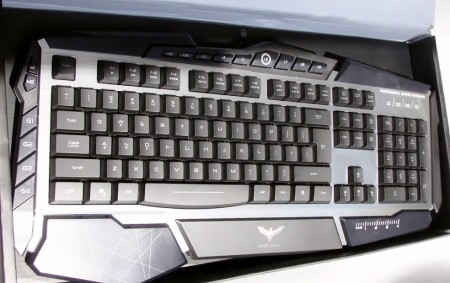
<p><span style="font-size: small;"><span style="font-family: Tahoma;"> Upon inspecting the keyboard itself, it could be said that the device looked like a prop from an old 1980â€™s Science Fiction series and yet in a stark contrast it looked a little futuristic.   The shape of the keyboard itself was rather pleasing to the eye in spite of a few rough edges. Such as the wrist rest which is rather squared off for some peoples tastes.</span></span></p>
<p class="MsoNormal" style="margin: 0cm 0cm 0pt;">
<p class="MsoNormal" style="margin: 0cm 0cm 0pt; text-align: center;"><span style="font-size: small;"><span style="font-family: Tahoma;">Click For a Larger Image</span></span></p>
<p class="MsoNormal" style="margin: 0cm 0cm 0pt; text-align: center;">
<p class="MsoNormal" style="margin: 0cm 0cm 0pt; text-align: center;"><span style="font-size: 12pt; font-family: 'Times New Roman';"><span style="font-size: 12pt; font-family: 'Times New Roman';"><a class="lightbox" href="/images/reviews/Cyborg/front-nolights.jpg"><img src="/images/reviews/Cyborg/front-nolights.jpg" border="0" alt="alt" width="200" height="125" /></a></span></span></p>
<p class="MsoNormal" style="margin: 0cm 0cm 0pt;">
<p class="MsoNormal" style="margin: 0cm 0cm 0pt;"><span style="font-size: small;"><span style="font-family: Tahoma;">Along the top edge of the keyboard are the â€˜touch-sensitive controls. These change anything from volume control to the colour and brightness of the back-lit keys (more on this later) Starting from the left we have the control that switches the lights on or off.</span></span></p>
<p class="MsoNormal" style="margin: 0cm 0cm 0pt;">
<p class="MsoNormal" style="margin: 0cm 0cm 0pt; text-align: center;"><span style="font-size: small;"><span style="font-family: Tahoma;">Click For a Larger Image</span></span></p>
<p class="MsoNormal" style="margin: 0cm 0cm 0pt; text-align: center;">
<p class="MsoNormal" style="margin: 0cm 0cm 0pt; text-align: center;"><span style="font-size: 12pt; font-family: 'Times New Roman';"><span style="font-size: 12pt; font-family: 'Times New Roman';"><a class="lightbox" href="/images/reviews/Cyborg/volume.jpg"><img src="/images/reviews/Cyborg/volume.jpg" border="0" alt="alt" width="200" height="125" /></a></span></span></p>
<p class="MsoNormal" style="margin: 0cm 0cm 0pt;">
<p><span style="font-size: small;"><span style="font-family: Tahoma;">Next we have the volume control, this is adjusted by simply touching the plus or minus keys. </span></span><span style="font-size: 12pt; font-family: 'Times New Roman';"><span style="font-size: 12pt; font-family: 'Times New Roman';"><span style="font-size: 12pt; font-family: 'Times New Roman';"> </span></span></span></p>
<p class="MsoNormal" style="margin: 0cm 0cm 0pt;"><span style="font-size: small;"><span style="font-family: Tahoma;">After this we have the multi media player functions. Finally in the middle we have the function by which this keyboard is named after. Pressing this control changes the keyboard to the â€˜Cyborgâ€™ mode which disables the windows keys. This function by itself is a god-send as this prevents anyone depressing the key whilst blasting away at their favourite game.</span></span></p>
<p class="MsoNormal" style="margin: 0cm 0cm 0pt;"><span style="font-size: small;"><span style="font-family: Tahoma;"> </span></span></p>
<p><span style="font-size: small;"><span style="font-family: Tahoma;"> </span></span></p>
<p class="MsoNormal" style="margin: 0cm 0cm 0pt; text-align: center;"><span style="font-size: small;"><span style="font-family: Tahoma;">Click For a Larger Image</span></span></p>
<p class="MsoNormal" style="margin: 0cm 0cm 0pt; text-align: center;">
<p class="MsoNormal" style="margin: 0cm 0cm 0pt; text-align: center;"><span style="font-size: 12pt; font-family: 'Times New Roman';"><span style="font-size: 12pt; font-family: 'Times New Roman';"><a class="lightbox" href="/images/reviews/Cyborg/cyborg.jpg"><img src="/images/reviews/Cyborg/cyborg.jpg" border="0" alt="alt" width="200" height="125" /></a></span></span></p>
<p class="MsoNormal" style="margin: 0cm 0cm 0pt; text-align: center;">
<p class="MsoNormal" style="margin: 0cm 0cm 0pt; text-align: center;"><span style="font-size: small;"><span style="font-family: Tahoma;">Click For a Larger Image</span></span></p>
<p class="MsoNormal" style="margin: 0cm 0cm 0pt; text-align: center;">
<p class="MsoNormal" style="margin: 0cm 0cm 0pt; text-align: center;"><span style="font-size: 12pt; font-family: 'Times New Roman';"><span style="font-size: 12pt; font-family: 'Times New Roman';"><a class="lightbox" href="/images/reviews/Cyborg/cyborg-wide.jpg"><img src="/images/reviews/Cyborg/cyborg-wide.jpg" border="0" alt="alt" width="200" height="125" /></a></span></span></p>
<p class="MsoNormal" style="margin: 0cm 0cm 0pt; text-align: center;"><span style="color: #ff6600;">Light Zones</span></p>
<p><span style="font-size: small;"><span style="font-family: Tahoma;">The last section of the keyboard control panel is the â€˜zoningâ€™ section. This allows a user to assign a certain colour to a specific area of the keyboard for example: One may decide to set the WASD keys to green the numeric keypad to amber and the rest of the QWERTY keys to a lava-red. This is a novel idea which admittedly Saitek seems to have pulled off rather well.</span></span></p>
<p style="text-align: center;"><span style="font-size: small;"><span style="font-family: Tahoma;">Click For a Larger Image</span></span></p>
<p style="text-align: center;"><a class="lightbox" href="/images/reviews/Cyborg"><img src="/images/reviews/Cyborg/zone-function.jpg" border="0" alt="alt" width="200" height="125" /></a></p>
<p style="text-align: center;"><span style="color: #ff6600;">Metal Plated Keys</span></p>
<p><span style="font-size: small;"><span style="font-family: Tahoma;">Saitek have decided to coat the most used keys on the keyboard with a layer of chrome in an attempt to make them more hard wearing. This would help to protect the keys whilst using the device for gaming into the wee hours of the morning. A bright idea however these keys have a â€˜slipperyâ€™ feel to them and ideally they finish should have been rough rather than smooth in order to give the user a more solid feel.</span></span></p>
<p style="text-align: center;"><span style="font-size: small;"><span style="font-family: Tahoma;">Click For a Larger Image</span></span></p>
<p style="text-align: center;"><span style="font-size: 12pt; font-family: 'Times New Roman';"><a class="lightbox" href="/images/reviews/Cyborg/16122008544.jpg"><img src="/images/reviews/Cyborg/16122008544.jpg" border="0" alt="alt" width="200" height="125" /></a> <a class="lightbox" href="/images/reviews/Cyborg/16122008546.jpg"><img src="/images/reviews/Cyborg/16122008546.jpg" border="0" alt="alt" width="200" height="125" /></a></span></p>
<p style="text-align: center;"><span style="font-size: 12pt; font-family: 'Times New Roman';"><a class="lightbox" href="/images/reviews/Cyborg/space-bar.jpg"><img src="/images/reviews/Cyborg/space-bar.jpg" border="0" alt="alt" width="200" height="125" /></a> <a class="lightbox" href="/images/reviews/Cyborg/cursor-keys.jpg"><img src="/images/reviews/Cyborg/cursor-keys.jpg" border="0" alt="alt" width="200" height="125" /></a></span></p>
<h3 style="text-align: center;"><span style="font-size: 12pt; font-family: 'Times New Roman';"><span style="color: #ff6600;">The Typing Experience</span></span></h3>
<p><span style="font-size: 12pt; font-family: 'Times New Roman';"><span style="color: #000000;"> </span></span></p>
<p class="MsoNormal" style="margin: 0cm 0cm 0pt;"><span style="font-size: small;"><span style="font-family: Tahoma;"><span style="color: #000000;">The typing experience was much better than the Micro Soft Reclusa and indeed this review was completed on the Cyborg keyboard itself. The average word speed increased slightly and the typing documents was pleasant but was marred by the lack of texture on the WASD and space bar keys.</span></span></span></p>
<p class="MsoNormal" style="margin: 0cm 0cm 0pt;"><span style="color: #000000;"><br />
</span></p>
<p><span style="color: #000000;"> </span></p>
<h3 class="MsoNormal" style="margin: 0cm 0cm 0pt;"><span style="color: #ff6600;">Gaming</span></h3>
<p class="MsoNormal" style="margin: 0cm 0cm 0pt;">
<p class="MsoNormal" style="margin: 0cm 0cm 0pt;"><span style="font-size: small;"><span style="font-family: Tahoma;">Overall gaming was pleasant on this keyboard with many a game played, ranging from adventure to first-person shooters. The back lit keys in conjunction with the zone functions proved to a boon and worked rather well. However the software that came with keyboard was badly written and planned to say the least, getting it to work on many games was a royal pain. However on the Saitek forums there are some beta drivers available that offer a much more of a pleasurable programming experience, which helps to detract somewhat from the annoying default software bundle!</span></span></p>
<p class="MsoNormal" style="margin: 0cm 0cm 0pt;">
<p class="MsoNormal" style="margin: 0cm 0cm 0pt; text-align: center;"><span style="font-size: small;"><span style="font-family: Tahoma;">Click For a Larger Image</span></span></p>
<p class="MsoNormal" style="margin: 0cm 0cm 0pt; text-align: center;">
<p class="MsoNormal" style="margin: 0cm 0cm 0pt; text-align: center;"><a class="lightbox" href="/images/reviews/Cyborg/dark-shot5.jpg"><img src="/images/reviews/Cyborg/dark-shot5.jpg" border="0" alt="alt" width="200" height="125" /></a> <a class="lightbox" href="/images/reviews/Cyborg/dark-shot2.jpg"><img src="/images/reviews/Cyborg/dark-shot2.jpg" border="0" alt="alt" width="200" height="125" /></a></p>
<p class="MsoNormal" style="margin: 0cm 0cm 0pt; text-align: center;">?</p>
<p class="MsoNormal" style="margin: 0cm 0cm 0pt; text-align: center;"><a class="lightbox" href="/images/reviews/Cyborg/keyboard-glow-big.jpg"><img src="/images/reviews/Cyborg/keyboard-glow-big.jpg" border="0" alt="alt" width="200" height="125" /></a> <a class="lightbox" href="/images/reviews/Cyborg/dark-shot-6.jpg"><img src="/images/reviews/Cyborg/dark-shot-6.jpg" border="0" alt="alt" width="200" height="125" /></a></p>
<p class="MsoNormal" style="margin: 0cm 0cm 0pt; text-align: center;">
<h3 class="MsoNormal" style="margin: 0cm 0cm 0pt; text-align: center;"><span style="color: #ff6600;">Special Function Keys</span></h3>
<p class="MsoNormal" style="margin: 0cm 0cm 0pt;">
<p class="MsoNormal" style="margin: 0cm 0cm 0pt;"><span style="font-size: small;"><span style="font-family: Tahoma;">The special function keys lay on both sides of the keyboard that are also lit by the â€˜zoneâ€™ function. However for those whom are on the wrong side of thirty would agree that they look like the old Atari 800XL keys and would give rise to suspicions of their longevity in regards to the repeated frantic hammering during an intensive gaming session.</span></span></p>
<p class="MsoNormal" style="margin: 0cm 0cm 0pt;">
<p class="MsoNormal" style="margin: 0cm 0cm 0pt; text-align: center;"><span style="color: #ff6600;"><a class="lightbox" href="/images/reviews/Cyborg/lit-side-keys.jpg"><img src="/images/reviews/Cyborg/lit-side-keys.jpg" border="0" alt="alt" width="200" height="125" /></a> <a class="lightbox" href="/images/reviews/Cyborg/16122008545.jpg"><img src="/images/reviews/Cyborg/16122008545.jpg" border="0" alt="alt" width="200" height="125" /></a></span></p>
<p class="MsoNormal" style="margin: 0cm 0cm 0pt; text-align: center;">
<p style="text-align: center;"><span style="font-size: 12pt; font-family: 'Times New Roman';"> </span></p>
<h3 class="MsoNormal" style="margin: 0cm 0cm 0pt; text-align: center;"><span style="color: #ff6600;">USB and Sound Leads</span></h3>
<p class="MsoNormal" style="margin: 0cm 0cm 0pt;">
<p><span style="font-size: small;"><span style="font-family: Tahoma;">The sound lead was not tested due to audio functions of the review computer being calibrated to use a digital output only. However the USB function was tested.</span></span><span style="font-size: 12pt; font-family: 'Times New Roman';"> </span></p>
<p class="MsoNormal" style="margin: 0cm 0cm 0pt;">
<p class="MsoNormal" style="margin: 0cm 0cm 0pt;"><span style="font-size: small;"><span style="font-family: Tahoma;">Saitek have thought to include a USB hub built inside of the keyboard. However rather than it being a hub it is more of an extension as the keyboard has only one USB port. A great many devices were tested on this port and the only device that had a major problem with was the Nikon D40X DSLR camera. The keyboard would detected the camera and then would suddenly drop the device from the USB hardware section.</span></span></p>
<p style="text-align: center;"><a class="lightbox" href="/images/reviews/Cyborg/usb-port.jpg"><img src="/images/reviews/Cyborg/usb-port.jpg" border="0" alt="alt" width="200" height="125" /></a> <a class="lightbox" href="/images/reviews/Cyborg/usb-sound-leads.jpg"><img src="/images/reviews/Cyborg/usb-sound-leads.jpg" border="0" alt="alt" width="200" height="125" /></a></p>
<h3 style="text-align: center;"><span style="color: #ff6600;">A return to the Light Zones</span></h3>
<p><span style="font-size: small;"><span style="font-family: Tahoma;">What follows are a selection of various images depicting the Saitek Cyborg keyboard; baring all its glory in the dark.</span></span></p>
<p style="text-align: center;"><span style="font-size: small;"><span style="font-family: Tahoma;">Click For a Larger Image</span></span></p>
<div style="text-align: center;"><a class="lightbox" href="/images/reviews/Cyborg/amber.jpg"><img src="/images/reviews/Cyborg/amber.jpg" border="0" alt="alt" width="200" height="125" /></a> <a class="lightbox" href="/images/reviews/Cyborg/front-lights.jpg"><img src="/images/reviews/Cyborg/front-lights.jpg" border="0" alt="alt" width="200" height="125" /></a></div>
<div style="text-align: center;"><a class="lightbox" href="/images/reviews/Cyborg/17122008574.jpg"><img src="/images/reviews/Cyborg/17122008574.jpg" border="0" alt="alt" width="200" height="125" /></a> <a class="lightbox" href="/images/reviews/Cyborg/dark-lights-green.jpg"><img src="/images/reviews/Cyborg/dark-lights-green.jpg" border="0" alt="alt" width="200" height="125" /></a></div>
<div style="text-align: center;"><a class="lightbox" href="/images/reviews/Cyborg/keyboard-shot1.jpg"><img src="/images/reviews/Cyborg/keyboard-shot1.jpg" border="0" alt="alt" width="200" height="125" /></a> <a class="lightbox" href="/images/reviews/Cyborg/lavared.jpg"><img src="/images/reviews/Cyborg/lavared.jpg" border="0" alt="alt" width="200" height="125" /></a></div>
<div style="text-align: center;"><span style="font-size: small;"><span style="font-family: Tahoma;">A bold attempt at constructing the â€˜ultimateâ€™ gamers keyboard, however it is marred by an annoying software bundle and the &#8216;all too&#8217; smooth WASD keys. It is with hopes that Saitek will address these small issues. The design of the keyboard as a whole is subject to taste, however it is not unpleasing. The overall feel of the keyboard is off a good quality and as both a gamer and as an instrument to type on it is worth the investment.</span></span></div>
<div style="text-align: center;"><span style="font-size: small;"><span style="font-family: Tahoma;">Pros:</span></span></div>
<p><span style="font-size: small;"><span style="font-family: Tahoma;"> </span></span></p>
<div style="text-align: center;">
<p><strong><span style="color: #ff9900;">Fantastic Build Quality</span></strong></p>
<div style="text-align: center;"><span style="color: #ff9900;"> <span style="font-size: small;"><span style="font-family: Tahoma;"> </span></span></span><span style="font-family: Tahoma;"></p>
<div style="text-align: center;"><strong><span style="color: #ff9900;">Brilliant Light Zoning Functions</span></strong></div>
<div style="text-align: center;"><span style="color: #ff9900;"><span style="font-family: Tahoma;"> </span></span><strong><span style="color: #ff9900;"> <span style="font-size: small;"><span style="font-family: Tahoma;"> </span></span></span></strong><span style="font-size: small;"><span style="font-family: Tahoma;"></p>
<div style="text-align: center;"><strong><span style="color: #ff9900;">Metal Coated Keys (but they have no texture)</span></strong></div>
<p></span><strong><span style="color: #ff9900;"><span style="font-family: Tahoma;"> </span></span></strong></span></div>
<p></span></div>
</div>
<p><strong><span style="color: #ff9900;"> </span></strong></p>
<p><strong><span style="color: #ff9900;"> <span style="font-size: small;"><span style="font-family: Tahoma;"> </span></span></span></strong><span style="font-size: small;"><span style="font-family: Tahoma;"> </span></span></p>
<div style="text-align: center;"><strong><span style="color: #ff9900;">Disabling the Windows Keys in Cyborg Mode</span></strong></div>
<p><strong><span style="color: #ff9900;"><span style="font-family: Tahoma;"> </span></span></strong></p>
<div style="text-align: center;"><strong><span style="color: #ff9900;"> </span></strong></div>
<p><strong><span style="color: #ff9900;"> <span style="font-size: small;"><span style="font-family: Tahoma;"> </span></span></span></strong><span style="font-size: small;"><span style="font-family: Tahoma;"> </span></span></p>
<div style="text-align: center;"><strong><span style="color: #ff9900;">Bright Range of colours</span></strong></div>
<p style="text-align: center;"><span style="font-size: small;"><span style="font-family: Tahoma;">Cons:</span></span></p>
<p><span style="font-size: small;"><span style="font-family: Tahoma;"> </span></span></p>
<div style="text-align: center;"><span style="color: #ff6600;"><strong>Annoying Default Software Bundle</strong></span></div>
<p><span style="font-size: small;"><span style="font-family: Tahoma;"> </span></span></p>
<div style="text-align: center;"><span style="color: #ff6600;"><strong>Slippery WASD, space bar and Cursor Keys</strong></span></div>
<p><span style="font-size: small;"><span style="font-family: Tahoma;"> </span></span><span style="font-size: 12pt; font-family: 'Times New Roman';"> </span></p>
<p class="MsoNormal" style="margin: 0cm 0cm 0pt;"><span style="font-size: small;"><span style="font-family: Tahoma;">A great first attempt by Saitek but the small issues should be addressed by the next product launch/revision. A work of beauty marred only by a few scars</span></span>.</p>
<p class="MsoNormal" style="margin: 0cm 0cm 0pt;">
<h1 class="MsoNormal" style="margin: 0cm 0cm 0pt; text-align: center;"><span style="color: #000000;">SCORE 85%</span></h1>
<p class="MsoNormal" style="margin: 0cm 0cm 0pt; text-align: center;">
<p class="MsoNormal" style="margin: 0cm 0cm 0pt; text-align: center;"><span style="font-size: small;"><span style="font-family: Tahoma;">gilgamesh</span></span></p>
]]></content:encoded>
			<wfw:commentRss>http://www.overclockerstech.com/saitek-cyborg-keyboard-review/feed/</wfw:commentRss>
		<slash:comments>0</slash:comments>
		</item>
	</channel>
</rss>